
Run every site from one system, but decide deliberately what's shared and what's local. Share households, referral partners, donors and reporting across the whole network, so duplicates are caught and totals add up. Keep stock, sessions, volunteers and day-to-day decisions local to each site, with stock moved between sites on the record. That gives each centre control of its own work and gives the network one accurate picture.
Why is running several food bank sites hard?
Many food banks don't operate from a single building. Trussell food banks distributed parcels from more than 1,600 locations in 2025 (Trussell) — a single food bank often runs several distribution centres in church halls and community centres across its area. Dioceses, councils and community networks coordinate food support across many sites at once.
Each site has its own volunteers, its own sessions and often its own shelves. But the households, the referral agencies and the funders don't think in sites. A family may visit two centres; an agency refers to whichever is nearest; a funder wants one figure for the whole area.
How do multi-site food banks usually manage?
Without a shared system, each site tends to develop its own:
• A spreadsheet per centre for households and parcels, each laid out slightly differently.
• A stock count per site — or one combined count that nobody trusts.
• Stock moved between sites in a car boot, recorded nowhere.
• A coordinator who collects figures from each site by email at the end of every quarter and adds them up.
What goes wrong?
• Households are counted twice. A family that uses two centres appears in two spreadsheets, so network totals overstate how many households you helped, and visit guidelines can't be applied across sites.
• Shortages are hidden. One centre runs out of tinned meat while another has a surplus. A combined total looks fine; a car-boot transfer fixes it, but nobody records it.
• Reports take days. Merging figures from several differently laid-out files is slow and error-prone.
• Practice drifts apart. Each site packs different parcels, records different things and applies different rules.
• Access is all or nothing. Shared spreadsheets either give site volunteers access to every household in the network, or keep each site's data in a silo.
How should a multi-site food bank be organised?
The key decision is what's checked and reported across the network, and what each site runs for itself.
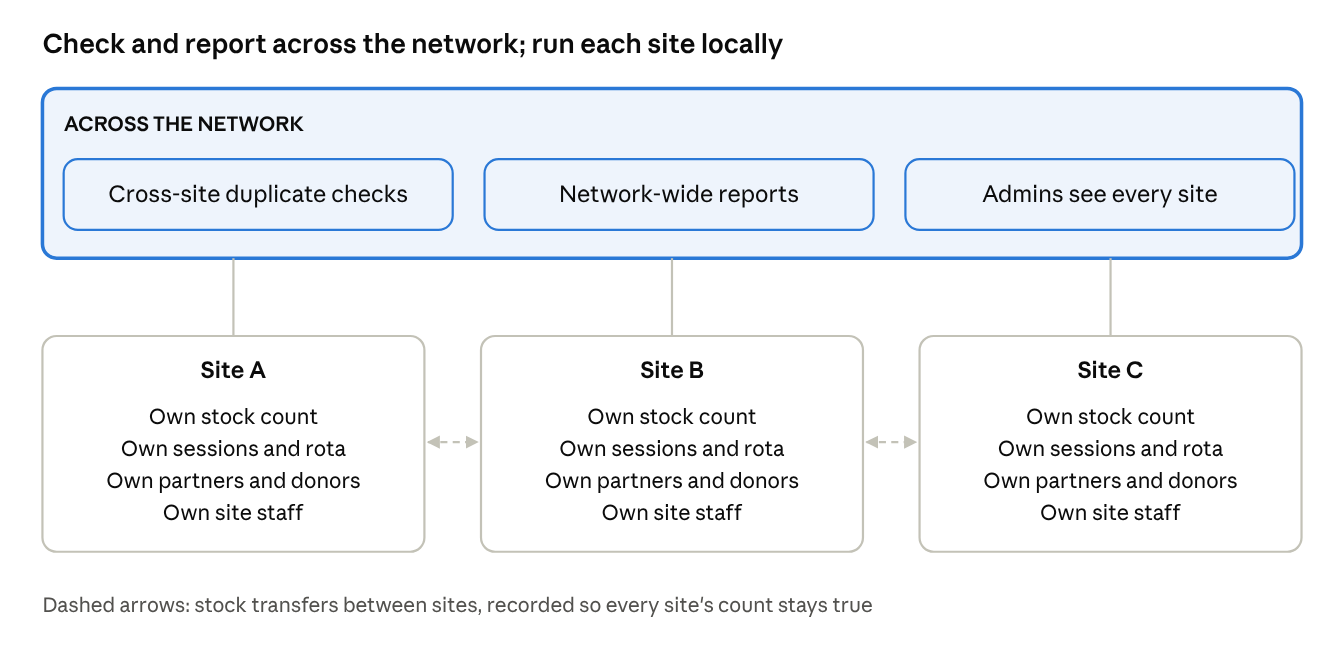
what's shared vs local · 3 sites
Check and report across the network:
• Duplicate checks across every site, so a family that visits two centres is spotted, and visit guidelines can be applied network-wide.
• Network-wide reporting, so totals for trustees and funders are one figure, not a sum of spreadsheets.
• A network administrator who can see every site, to spot shortages, compare sites and step in when needed.
• Parcel standards, so a family of four gets the same parcel at every centre.
Keep local to each site:
• Stock. Each site counts its own shelves, so a shortage at one isn't hidden by a surplus at another.
• Sessions, rotas and site staff. Local coordinators run their own days.
• Referral partners and donors. Each site works with its own local agencies and supporters, while a network administrator can still see them all.
• Access. Site staff see their own site, not the whole network.
And record what moves between them: a transfer of stock from one site to another is recorded on both sides, so both counts stay accurate.
What should you look for in multi-site food bank software?
|
Question to ask |
Why it matters |
|
Does each site have its own stock count? |
A single combined count hides local shortages |
|
Can stock be transferred between sites on the record? |
Keeps every site's count accurate when food moves |
|
Are duplicate households checked across all sites? |
Stops double counting and lets visit guidelines work network-wide |
|
Can you report per site and for the whole network? |
Site leads need their own figures; funders want the total |
|
Are there site-level staff roles? |
Site staff see their site; network admins see everything |
|
How is an extra site priced? |
Per-site and per-user charges add up quickly for networks |
How does FoodBank360 manage multiple food bank locations?
• Each site has its own stock. Stock is counted per site, and items can be transferred from one site to another, so every site's count stays accurate. Referral partners and donors also belong to a site, and administrators can see them across all sites.
• Duplicate checks across sites. FoodBank360 checks for duplicates across your whole network, not just within one centre.
• Reports per site and network-wide. Run reports for a single site, or across the network for trustees and funders.
• Admin and site staff roles. Site staff see only their own site; administrators can view and manage every site.
• One set of parcel templates. Parcels can be defined once and used at every site, so households get the same parcel wherever they go.
• Unlimited users at every site. No per-user charges, however many volunteers your sites have.
Pricing: each additional location is £25 a month on top of your plan. For larger structures — multi-site networks, dioceses and redistribution hubs — the Enterprise plan is priced to fit and includes a dedicated account manager and priority support. See pricing →
Multi-site food bank FAQs
Should each food bank site have its own stock count? Yes. A combined count hides shortages at individual sites. Count each site separately and record transfers between them.
How do we stop a family being registered at two of our sites? Keep one household list for the whole network and check new referrals against all of it, not just the site that received them.
How do we move food between sites without losing track? Record each transfer as stock leaving one site and arriving at the other, ideally at the time it's moved.
Can a church or diocese run food support across many parishes? Yes. The same principles apply: shared households and reporting, local stock and sessions. See FoodBank360 for churches.
What's the difference between an extra location and Enterprise? An extra location suits a food bank adding a second or third centre. Enterprise suits networks, dioceses and redistribution hubs that need network-level management, an account manager and priority support.
See your whole network in one place
Book a free demo and we'll show you site stock, transfers, cross-site duplicate checks and network reporting in FoodBank360.
Book a free demo · How to track food bank stock · Foodbank management system