
A spreadsheet can store a foodbank's records, but it can't connect them. Referrals, stock, parcels, deliveries and donors end up in separate sheets that someone has to keep in step by hand.
FoodBank360 replaces that hand-matching with one set of linked records: a referral becomes a household, the household's parcel comes out of stock, and the parcel shows up in the report. Below, we follow one foodbank Thursday both ways, so you can see exactly where the difference falls — and where a spreadsheet is still fine.
There are now at least 2,565 food banks in the UK, according to the Independent Food Aid Network, and Trussell food banks alone gave out more than 2.6 million emergency parcels in 2025 from more than 1,600 locations (Trussell). Behind many of those parcels is a volunteer with a laptop and a workbook called something like Referrals_2025_FINAL_v3.xlsx.
This isn't a criticism of that volunteer. Spreadsheets are free, familiar and flexible, and plenty of foodbanks run well on them. But the same habits that work at 15 parcels a week start to creak at 60, and the cracks tend to appear in the same eight places.
Spreadsheet vs FoodBank360: the eight workflows side by side
|
Task |
Spreadsheet workflow |
Where it goes wrong |
FoodBank360 workflow |
|
Taking referrals |
Agencies email or phone; a volunteer types each one into the referrals sheet |
Retyping errors; referrals sit unread in an inbox; no one can see the backlog |
Approved referral partners submit online; every referral lands in one pending approval queue |
|
Checking duplicates |
Someone scrolls or uses Find to spot a repeat household |
"Megan Doyle" and "M Doyle" at the same address look like two people |
New referrals are checked against existing households and likely duplicates are flagged for review |
|
Knowing your stock |
A separate stock sheet, updated after packing — if someone remembers |
The sheet and the shelves disagree by Thursday |
Donations and purchases add stock; issued parcels take it away automatically |
|
Checking expiry dates |
A volunteer walks the shelves, or a date column nobody sorts |
Food goes past its date before anyone notices |
Expiry-date and low-stock alerts flag what to use first and what to reorder |
|
Building parcels |
A printed list per parcel type; packers adjust by hand for big families |
No quick way to know how many parcels today's stock can make |
Parcel templates scale by household size; Calculate Stock shows how many you can build now |
|
Planning deliveries |
A driver sheet or WhatsApp message with names and addresses |
Missed drops aren't recorded; addresses get forwarded around |
A scheduled delivery list with a status for each parcel (FoodBank360 doesn't optimise routes) |
|
Recording donations |
A donor sheet, separate from stock, plus a list of who needs a thank-you |
Food donations never reach the stock sheet; thank-yous get missed |
Each donation is logged item by item against its donor, added to stock, with thank-you status |
|
Reporting |
Counting rows across several files before a trustee meeting |
Numbers differ depending on who counted and which file they used |
The dashboard and seven built-in reports update as you work, for any date range on the dashboard |
The pattern is the same in every row. The spreadsheet holds the information, but a person has to carry it from one sheet to the next. FoodBank360 carries it for you.
One Thursday, two ways
To make this concrete, here's a typical distribution day at a fictional foodbank: one site, 40 parcels a week, two paid staff and a dozen volunteers. Every name and number below is made up for illustration.
9am: how do food banks take referrals — and stop duplicates?
On spreadsheets. Overnight, three referrals have arrived: two by email (one from a school, one from a housing officer) and one as a voicemail from a GP surgery. The coordinator copies them into the referrals sheet. Here's what the sheet looks like after she's done:
Date,Name,Address,Adults,Children,Referred by,Diet
09/10,Megan Doyle,14 Elm Close,1,2,Riverside Primary,None
13/10,M. Doyle,14 Elm Cl.,1,2,Housing Options,Vegetarian
13/10,Tom Fielding,3 Mill Lane,2,0,Westgate Surgery,None
Rows one and two are the same household, referred by two different agencies four days apart, with the address and dietary details recorded differently. A sort by name won't put them together, and a Find for "Megan Doyle" won't match "M. Doyle". Whether anyone notices depends on who's on shift and how closely they're reading.
On FoodBank360. The school and housing team are approved referral partners, so they submitted online, and both referrals are already waiting in a pending approval queue — nothing was retyped. When the housing referral came in, FoodBank360 checked it against existing households and flagged it as a likely duplicate. The coordinator opens it, sees the earlier referral from the school, notices the updated dietary need, and decides what to do. The system finds the duplicate; a person still makes the call.
The GP surgery's voicemail still needs a human, but it's typed in once, into the same queue as everything else.
Why duplicate checking matters: it isn't only about stopping people "getting two parcels". Duplicate records split a household's history, so the next volunteer can't see that the family has been in three times this month, or that their diet changed.
11am: can today's stock fill today's parcels?
Twelve households are booked to collect an adult parcel this afternoon. Here's the foodbank's adult parcel and what's on the shelves:
|
Item |
Per adult parcel |
In stock |
Parcels it can cover |
|
Baked beans (tin) |
2 |
40 |
20 |
|
Pasta (500g) |
1 |
30 |
30 |
|
Chopped tomatoes (tin) |
2 |
26 |
13 |
|
Breakfast cereal |
1 |
25 |
25 |
|
UHT milk (1 litre) |
1 |
22 |
22 |
|
Tea bags (box of 80) |
1 |
9 |
9 |
Illustrative figures, not real stock data.
The answer is 9 parcels, not 12 — and it isn't the beans or the pasta that run out. It's the tea, a cheap item that nobody was watching.
On spreadsheets, finding this out means opening the stock sheet, checking that it was updated after Tuesday's session, and doing the division for every line. Often, the first anyone knows is when a packer reaches an empty shelf. Then someone runs to the shop, or three families get a parcel without tea.
On FoodBank360, the coordinator presses Calculate Stock on the adult parcel template and gets the number straight away. A low-stock alert had already flagged the tea bags. And because each issued parcel takes its items out of stock, the count reflects Tuesday's session without anyone having to update a sheet.
The same templates handle households that don't fit the standard parcel. A family of two adults and three children gets an adult parcel plus Additional Adult and Additional Child parcels on top. A household living in temporary accommodation with only a kettle gets a kettle parcel of food that needs no cooking.
How do food banks track expiry dates?
On spreadsheets, usually by walking the shelves. A "use by" column exists in theory, but it only helps if every donation was dated on arrival and someone sorts the column each week. Short-dated food is easy to miss because it looks like everything else on the shelf.
On FoodBank360, expiry dates are recorded as stock comes in, and expiry alerts flag what needs to go out first. In our example, 18 tins of soup due to expire next Friday would be flagged on Monday — in time to put them in this week's parcels rather than the bin.
2pm: deliveries, and the household that missed its slot
Four households can't travel to collect, so a volunteer driver takes their parcels out.
On spreadsheets, the coordinator copies four names, addresses and phone numbers into a message to the driver. That's personal data now sitting on a volunteer's phone, outside any system you control. When the driver can't get an answer at one address, he texts back, and the coordinator makes a note to rebook the household — somewhere.
On FoodBank360, the driver works from the scheduled delivery list and updates each parcel's status as he goes. The undelivered parcel stays visible, and the household can be moved to the next session that still has space, so it doesn't fall through the gap between a text message and a spreadsheet.
To be clear about what FoodBank360 doesn't do: it doesn't plan or optimise driving routes. Your team still decides the order of the drops. What changes is that every delivery has a record and a status.
3pm: a supermarket donation arrives
A local supermarket drops off 21 items from its collection point.
On spreadsheets, this usually means two updates, in two files: a line in the donor sheet ("Supermarket collection, 21 items") and, ideally, 21 additions to the stock sheet. The second update is the one that gets skipped on a busy afternoon, which is how the stock sheet drifts away from the shelves. The thank-you email goes on a mental to-do list.
On FoodBank360, the donation is logged once, item by item, against the supermarket's donor record and given a receipt number. Those items go straight into stock. The donation list shows whether a thank-you has been sent, and the email can be sent from the same screen. Food the foodbank buys itself is logged separately as a purchase, with the supplier and the cost, so donated and bought stock aren't muddled.
End of the month: the trustee report
On spreadsheets, someone opens the referrals sheet, the parcels sheet, the donor sheet and the stock sheet, and counts. How many households? How many parcels? How many from each referral agency? The answers depend on whether duplicates were cleaned up and whether every parcel was logged.
On FoodBank360, the dashboard already shows the month's totals for any date range: households, parcels out, donations in, stock on hand and cash received. Seven built-in reports — donors, incoming food and cash, referrer organisations, parcel clients, outgoing parcels, items and users — cover the detail, and you can export them.
The whole day at a glance
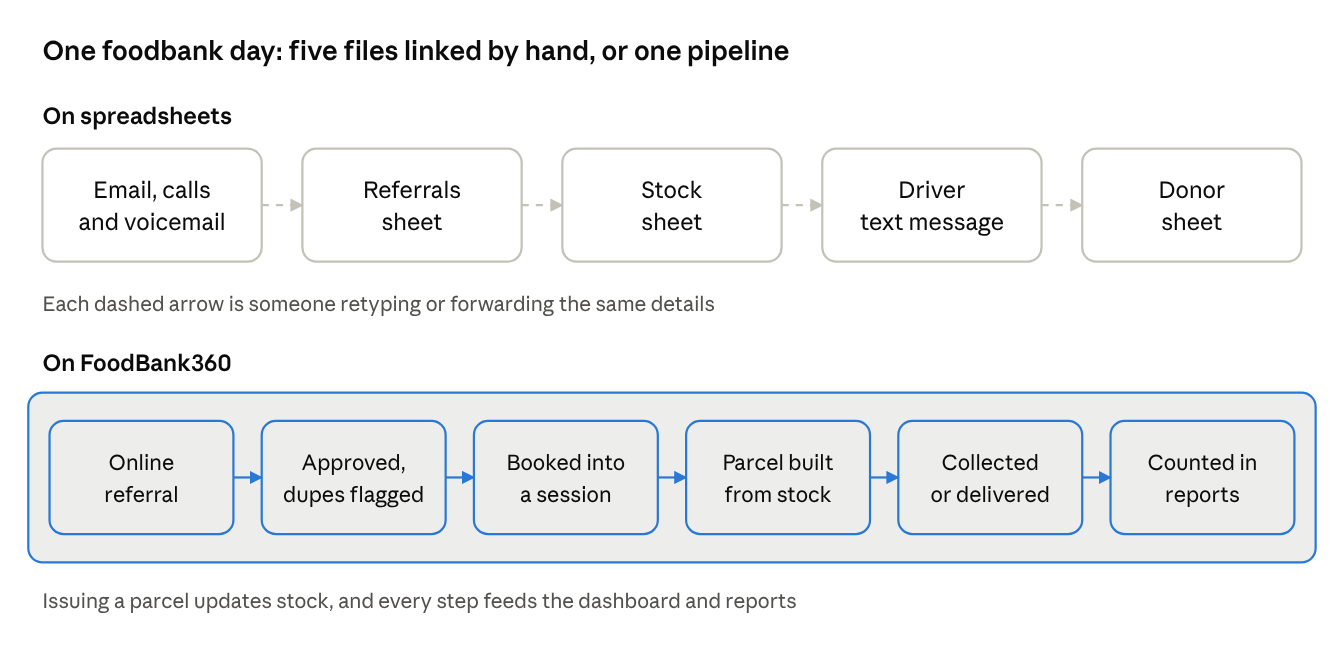
the same day on spreadsheets vs on FoodBank360
On spreadsheets, the day's information exists, but it lives in five places joined by people copying it across. On FoodBank360, one record moves through each step, and stock and reports update as it goes.
Can a food bank run on a spreadsheet?
Yes, and many do. A spreadsheet is a sensible choice if most of these are true:
• You give out fewer than around 15–20 parcels a week.
• One or two people keep all the records, and they're on shift every session.
• Referrals come from a handful of agencies you know well.
• You don't deliver, or deliveries are rare.
• Nobody outside your team needs reports more than once or twice a year.
At that size, the hand-matching between sheets is manageable, and software would add cost without removing much work. The problems in this post grow with volume, with the number of people touching the records, and with the number of agencies referring to you.
Is a spreadsheet really free?
The licence is free. The work isn't. Every hour spent retyping referrals, reconciling the stock sheet or counting rows for a report is an hour of staff or volunteer time. A quick way to put a number on it: note how many hours a week your team spends on record-keeping that isn't helping someone directly, then multiply by an hourly rate.
Spreadsheets also fail quietly. In audits by spreadsheet-error researcher Raymond Panko, errors turned up in 49 of 54 spreadsheets examined (Computerworld, 2004). That research is old and wasn't about foodbanks, but the lesson holds: a sheet maintained by several busy people by hand will contain mistakes, and nothing tells you where they are.
For comparison, FoodBank360's published prices exclude VAT and include unlimited users. The Thursday described above uses the Full plan at £114.99 a month (20% less if paid yearly). If your main problem is referrals, the Referrer plan, at £34.99 a month, covers online referrals, duplicate detection and household records. Every plan has a one-off £100 setup fee. See what each plan includes →
Is a spreadsheet GDPR-compliant for food bank client data?
It can be, but it's harder to keep it that way. Foodbank records hold sensitive personal information: names, addresses, household make-up, sometimes health-related dietary needs. Under UK GDPR, you must keep that data secure, accurate and only for as long as you need it (ICO: the data protection principles).
Spreadsheets make each of those harder:
• Security: files get emailed, downloaded to personal laptops and copied into messages for drivers. Each copy is another place the data can leak.
• Access: anyone who can open the file can usually see every household, including volunteers who only need to know what to pack.
• Accuracy: duplicate and outdated rows are exactly the kind of inaccurate data the principles warn against.
• Retention: deleting old records means finding every copy of every file.
FoodBank360 keeps records in one UK-hosted system, with two-factor sign-in, role-based access so each person sees only what their role needs, and regular backups. Software doesn't make you compliant on its own — your policies still matter — but it removes most of the copies.
When should a food bank switch from spreadsheets to software?
The right time is usually when the spreadsheet starts needing a person to hold it together. If you tick four or more of these, it's worth looking at software:
• ☐ You have more than one file for referrals, stock or donors, and they're regularly out of step.
• ☐ You've found the same household under two names or spellings.
• ☐ Only one or two people really understand how the spreadsheet works.
• ☐ Referrals reach you by email, phone and paper, and some get missed.
• ☐ You've run out of an item mid-session without warning.
• ☐ Food has gone past its date on your shelves.
• ☐ Delivery details are sent to drivers by text or WhatsApp.
• ☐ Preparing a trustee or funder report takes more than an afternoon.
• ☐ Donors haven't been thanked because nobody knew who was outstanding.
• ☐ Volunteers can see more personal data than their role needs.
How do you move food bank records from Excel into software?
You don't have to start from scratch. A typical move to FoodBank360 looks like this:
1. Book a demo and walk through your current process — including the spreadsheet — with our team.
2. Tidy what you have. Merge duplicate households and archive records you no longer need to keep. This is worth doing whatever system you choose.
3. Set up parcel templates and roles, so each template matches what you actually pack and each person sees only what they need.
4. Import your records. FoodBank360 supports bulk import, and our team helps map your spreadsheet columns to the right fields.
5. Invite referral partners to register, then accept them so they can refer online.
6. Run your next session on the system, keeping the old spreadsheet read-only for reference until you're confident.
Frequently asked questions
Is there a free food bank spreadsheet template I can use instead? There are plenty of free inventory templates online, and they're a reasonable start for a very small group. Most are built for home or shop stock, though, so they won't link referrals, households and parcels — you'd still be matching sheets by hand.
Can we keep using spreadsheets for some things? Yes. Some foodbanks keep a spreadsheet for things like event planning or a volunteer phone list. And you can export reports from FoodBank360 into a spreadsheet whenever you want to work with the numbers yourself.
Do volunteers need training to use FoodBank360? Volunteers only see the parts their role allows, which keeps each screen simple. Our team supports onboarding as part of setup, and support is available Monday to Friday, 9am to 6pm UK time.
Does FoodBank360 work outside the UK? Yes. The referral, stock, parcel, delivery and donation workflows work the same in any country. Gift Aid and DBS tracking are UK-specific, and plans are billed in pounds sterling.
Is there a free trial? No, but there's a free demo, where we walk through FoodBank360 using your own referral and parcel process, so you can judge whether it fits.
See your own Thursday in FoodBank360
Bring your spreadsheet to a free demo. We'll show you how your referrals, parcel templates, stock and donations would look in FoodBank360 — and tell you honestly if a spreadsheet is still the better fit for your size.
Book a free demo · See pricing · What is FoodBank360?
Related reading: Foodbank management system · Charity donation system · Foodbank, food pantry or social supermarket? The real UK differences